

In Episode #2 of Fundament, we are focusing on helpful tips for planning practical workshops. We will discuss popular workshop methods that originated from Design Thinking. You will also find valuable tools for facilitating online and hybrid workshops.
What is waiting for you in this newsletter:
🔥 Five tips on planning effective design workshops
🛠️ Five popular design thinking workshop methods
📋 A template of a stakeholder invitation to a workshop
🖍️ A free whiteboarding tool as an alternative to Miro and Figjam
Ready? Let’s begin!
Why workshops are so valuable
Workshops are an innate part of the design process. They can be helpful at both the discovery and the ideation phases. Workshops can bring answers and insights as well as be a space for collaborative work on different solutions. They might be both internal and external, depending on the role of the facilitator. By the way, that’s you, the person who runs the workshop.
Internal and external workshops
If you are an in-house designer, in most cases, you will invite people only from inside your organization, so it will be an internal workshop. There’s a high chance you know most of the stakeholders and see them in your office every day.
However, if you work as a consultant or in an agency, you will likely not know most of the participants before the workshop. You will invite stakeholders from different departments of the client, but until this day, you spoke to maybe just one of them. It might bring more stress and weaken the workshop results, especially if this is your first time as a facilitator.
What can you do to ensure that any type of workshop does not end as a disaster? What steps should you take before greeting all the participants in the room with a smile on your face?
Tips on planning and facilitating effective workshops
Here are five things you need to tick off from your list to run a practical workshop. We based this list on years of our own experience and input from other designers in the industry. You will also find a little bonus item at the end of the list.
Make sure all stakeholders are invited
Define clear goals
Prepare an agenda
Plan breaks and snacks
Bring a Moderator
Bonus – tools for online and hybrid workshops
1. Make sure all stakeholders are invited
This might sound obvious, but this is the first box to tick off. If stakeholders can’t make it, there’s not much sense in running the workshop at all. How do we make sure invites aren’t missed, and people attend?
The more informative the invite is, the higher the chance it won’t be missed. Carefully write an invitation message telling the participants the workshop's theme, how long it will take, and why they are the inevitable attendants. Time also plays a huge role, so ensure it’s delivered relatively early. But not too early - just 2-3 weeks before should be enough not to generate any conflict in people's calendars.
Here’s a template of an invitation message, which you can use to invite a stakeholder to your workshop. Just change the stakeholder’s job title, the date, and the theme of your workshop.
Hi John Doe,
I’d like to invite you to a workshop, on which we will use our collective mind to find a solution to improve the current checkout process in our online store.
I look forward to seeing you participate in this workshop. As a Tech Lead, your presence is precious to make progress. The workshop will take place on Thursday 23rd of November from 10 a.m. to 4 p.m. in our office.
Please respond to this invitation by Thursday 16th of November and let me know if the proposed date and time don’t work for you.Thanks,
Arek
If invited folks don’t respond after a few days, use your favorite messaging channel to remind them about the invite and ask them to respond to it. When key stakeholders can not attend, you might be forced to look for a different date and time. But hey, it’s not the end of the world!
Remember to invite specific attendees, especially when acting as a Freelancer or working for an Agency and planning an external workshop. Ask for specific people holding specific job titles on the client side. You want to have people who are actually in charge in their respective areas and can make final calls.
2. Define clear goals
Workshops, like any other activity in the design process, need a specific goal to be set. List all the things you don’t yet know, but they are required to proceed with the project. Consider potential decisions and tasks you can’t make on your own. You better have a good excuse to pull all these people off from their daily work and sit them down in one room for a few hours.
There might be many excuses, but the most popular ones are:
Discovering stakeholders’ needs in the early discovery phase
Defining the problem in the discovery phase
Making decisions regarding critical components of the system in the ideation phase
Brainstorming ideas to solve a specific, previously identified problem in the ideation phase
When the goal is set, it’s time to plan the activities needed to achieve it.

3. Prepare an agenda
It is extremely important to think about activities prior to the workshop to make sure it will not end up as a disaster. There’s probably nothing more embarrassing than coming to a room full of stakeholders without any plan and trying to improvise the whole day.
Depending on the goal you have set and the stage of the project, you will put different methods and activities on your workshop’s agenda. Here are a few examples of popular methods you can try in both the discovery and ideation phases of the design process.
SCAMPER
Ideation and discovery method. A creative brainstorming method allows participants to see the existing product from a different perspective. It can also be utilized when working on the early stage of product development. Learn more about SCAMPER here: https://www.post-it.com/3M/en_US/post-it/ideas/articles/scamper-method/
The Anti-Problem
Ideation method. A great method to use when the team works on an existing problem but is stuck with ideas generation. The method’s purpose is to think about the problem and the solutions from the opposite direction. Read more about The Anti-Problem here: https://gamestorming.com/the-anti-problem/
The Love/Breakup Letter
Discovery method. This method will work best when working on an existing product. The team is trying to identify what are the strengths and weaknesses of the product by writing either the love or breakup letter, having in mind a specific functionality or attribute of the product. Learn more about The Love/Breakup Letter here: https://spin.atomicobject.com/2017/06/29/design-thinking-activity-love-breakup-letter/
Storyboarding
Ideation method. A creative method that helps visualize stories. It’s a collaborative activity with the goal of enhancing understanding of how the specific functionalities or user flows might look from the user’s perspective. Read more about Storyboarding here: https://www.nngroup.com/articles/storyboards-visualize-ideas/
Design Studio
Ideation method. An excellent activity for generating ideas, prioritizing work, and making attendees feel more engaged in the project. It combines brainstorming, design critique, and prioritization in one session. Learn more about Design Studio here: https://www.nngroup.com/articles/facilitating-design-studio-workshop/
Making attendees feel comfortable
Attendees can feel overwhelmed and intimidated by the complexity of the methods. It’s always a good idea to spend some time at the beginning of each activity explaining what the activity is about. It will help attendees to get familiar with the methods you picked and make the job easier for everyone.
Last but not least, to put on the agenda – icebreakers! Attendees might feel a bit stressed, shy, or uncomfortable just when the workshop starts. To slightly change the mood and attitude of the attendees, you can start with some icebreakers. These are short, fun games designed to break the ice between people who don’t know each other yet.
You can use this massive list of icebreaker games from Session Lab as an inspiration – https://www.sessionlab.com/blog/icebreaker-games/ – I’d especially recommend the Two Truths and One Lie and the Speed Dating.
4. Plan breaks and snacks
Some goals might be relatively simple, and all planned activities could end after just a couple of hours. However, in many cases, you will gather the participants for more than just an hour or two. It could be four or even eight hours of squizzing all the creative juices from their minds to the last drop. It could be exhausting, and people need breaks!
Don’t forget about planning short breaks every 60 - 90 minutes. Provide some snacks, coffee, tea, and water. Plan a lunch break if the workshop will take the whole day.

5. Bring a Moderator
In Moderated Usability Tests or In-depth Interviews, apart from a Participant and an Interviewer (or a Facilitator, if you will), there’s usually one more person: a Moderator. This guy is here to help an Interviewer make notes, keep the clock, and bring the agenda back on track if things go their own way.
Workshops are very similar in this matter. It would be helpful to have someone making notes and step in if things go off the plan. You might find yourself in a room with more than one strong personality, which almost always leads to flaming discussions. The clock is ticking, and there are more items you’d like to tick off from your original plan. A Moderator can be helpful in facilitating such scenarios. Some discussions need to be cut off if they don’t bring any value to the goals of the workshop.
They might also be a right hand of yours if the group is more extensive than ten people, especially when the workshop is offline. Being available to answer questions from participants when working in groups, distributing sticky notes and other materials, and keeping the clock.
6. Bonus. Remote and hybrid workshops
These days, many teams are spread around the world, and it could be challenging to gather them physically in one room. What could you do then? There are plenty of tools that will help you in running a fully remote or a hybrid workshop.
To connect with the participants, just use what you would usually use for a video call: Zoom, Microsoft Teams, Slack, or even Discord. It’s up to you and your organization.
For the work itself, use one of the whiteboarding tools. It could be Lucid Spark, Miro, Mural, or FigJam. All of these tools require a paid subscription but offer many helpful features such as a clock, voting, gathering, drawing, and, of course, sticky notes. Some of these tools also provide templates you can use to begin doing specific activities much quicker.
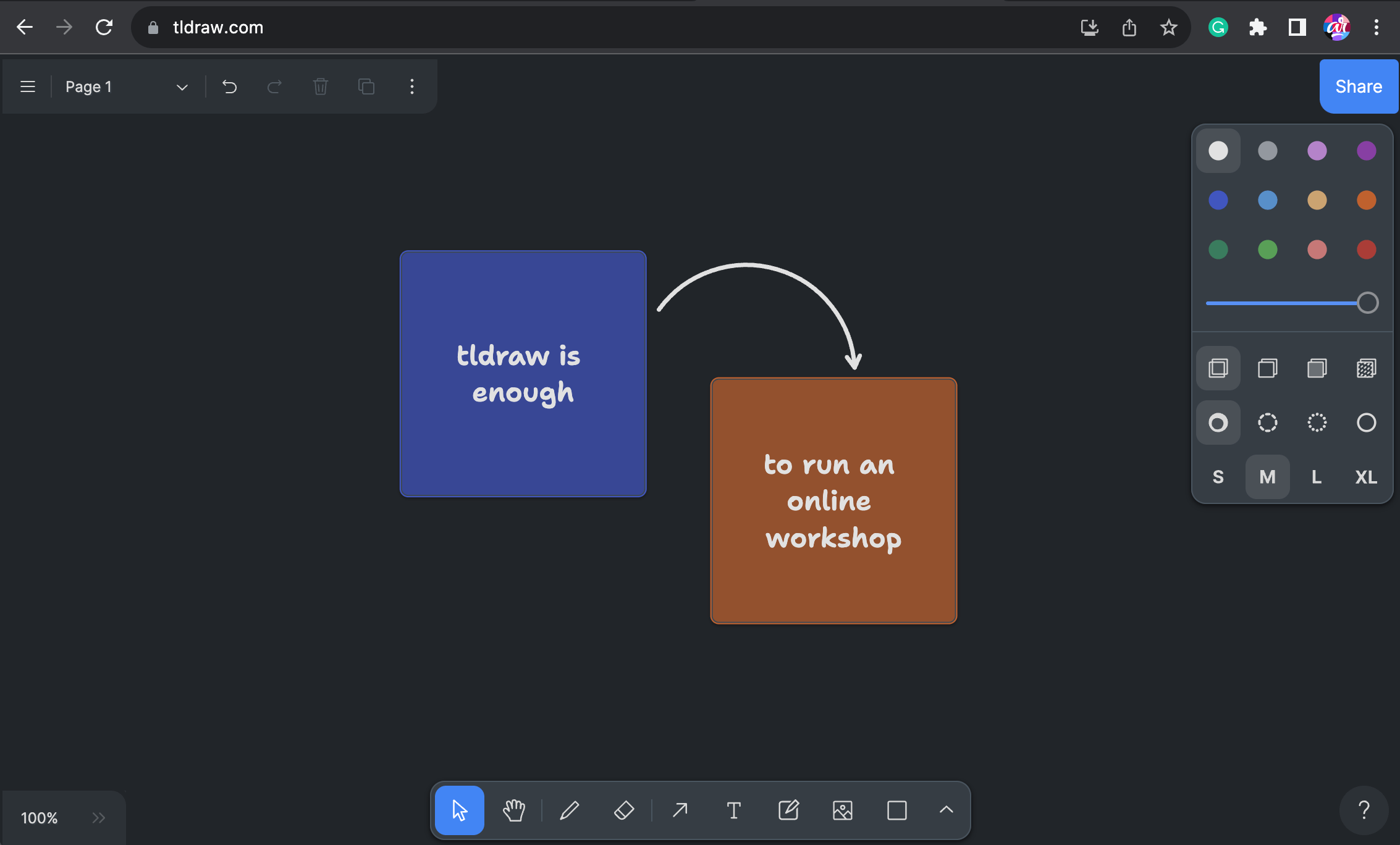
If you can’t afford a subscription, try tldraw as a free alternative. This tool does not offer all the functionalities I listed above but has all essential features, such as sticky notes and drawings. There’s also a multiplayer mode, so you can invite your participants and work together. In terms of keeping the clock – just use the one on your laptop, and you should be fine!
Don’t forget that not everyone who attends your workshop is familiar with the tool you are about to use. It’s a great idea to include instructions on how to use it somewhere on the board. Also, spend some time before the actual work starts on explaining what the tool is capable of and where to look for specific functionalities on the screen.
Summing up
Workshops might be very intimidating and stressful if you have never facilitated one. I remember how anxious I was when planning and running my very first one. But don’t worry too much. As with everything, you become a master when you practice enough. I hope the tips I gave you in this article will make this experience a little less stressful. Let me know in the comments how it went or what is your past experience in facilitating workshops.

Take part in our Survey
We are curious about what motivated people from all around the world to become Designers. Take part in our survey and share your story. The report will be published in the newsletter later this year. The survey is anonymous.
Image attribution
In this article, we used images from Unsplash authored by Paper Textures, Victor He, and Jason Goodman.